
LINE: Calls & Messages
LINE (LY Corporation)Communication
3.1231.08K Reviews
- Version
- Varies With Device
- Installs
- 1.00B
- Age Rating
- Everyone
Screenshots






Our Review of LINE: Calls & Messages
 Analysis by Appyee
Before deciding whether LINE belongs on your phone, I’d separate its price from its possible extras. The app is free to download, so trying its basic communication experience does not require an upfront payment. It also offers in-app purchases, with listed item prices ranging from $0.29 to $394.99. That is a broad range, not a promise that you need to spend anything, and it makes sense to treat optional purchases as something to check before tapping buy.
That distinction matters because LINE is most useful when the people you want to contact already use it. A free app can be a poor value if it creates another empty inbox, while a paid sticker or other purchase only makes sense if you actually want that item. I’d start with messaging and calls, see whether your regular contacts are there, and decide about extras later rather than treating the purchase menu as part of the cost of getting started.
Where the everyday value comes from
For me, the strongest reason to keep a communication app is whether it makes ordinary coordination easier. LINE brings chats and calls together, and its group conversations can suit a family trying to settle weekend plans or friends arranging a shared outing. A useful habit is to keep a group focused on one purpose: a thread for planning a trip is easier to follow than a single chat that mixes plans, jokes, and unrelated updates.
There is a small but practical trade-off in large groups. A group can include up to 500 people, which makes it possible to bring a substantial community into one conversation, but it also raises the chance that important messages get buried. For a smaller circle, I’d use a group when everyone needs the same information; for a sensitive or personal conversation, a one-to-one chat is clearer and less exposed to a crowded thread.
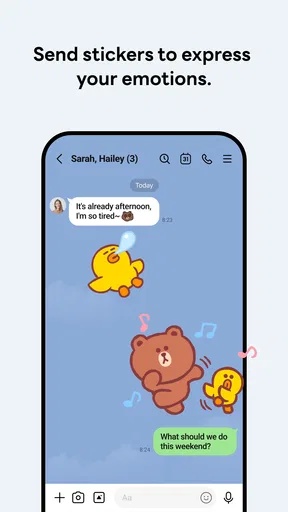
LINE’s stickers give conversations a more expressive tone, especially when a quick reaction feels warmer than a plain text reply. I would not assume every appealing sticker is free: some can be purchased, so it is worth checking the item rather than tapping through casually. If you mainly want straightforward text exchanges, stickers are an optional extra, not a reason you have to pay to communicate.
How it fits beside other messaging choices
Compared with a basic messaging app, LINE is more of a broad communication and social hub: chats and calls sit alongside a timeline, news content, payment features, games, and sticker collections. That range can be convenient if you want several kinds of activity in one place. It can also make the app feel busier than a focused messenger whose main job is simply to keep conversations uncluttered.
The better choice depends less on a feature checklist than on your contacts and habits. If family or friends already use LINE, joining them there may be simpler than persuading everyone to move. If your circle relies on another service, installing a second messenger may split conversations and notifications rather than improve them. I’d compare it with your current app by asking one concrete question: will the people I need to reach actually answer me here?
For payments, games, or news, availability and usefulness can depend on where you live and what services are accessible to you. I would not install LINE solely on the assumption that every extra will work the same way for every person. The communication tools are the natural starting point; explore other sections only if they fit your routine.
A practical way to try it
Imagine a relative is planning a family meal. You could use a group chat to agree on a time, share details, and follow up with a voice or video call if typing becomes tedious. Someone who cannot join the call can still catch up in the conversation. That kind of mixed use—short messages for logistics, a call when discussion is easier—is where having both formats together can feel helpful.
To keep the experience manageable, I’d begin with a few individual chats and only the groups that have a clear purpose. Then explore the other tabs at your own pace instead of trying every feature on day one. This is a simple way to judge whether LINE’s wider offering adds real convenience or just more places to check. If you prefer a quiet, single-purpose inbox, that test may confirm that a leaner alternative suits you better.
People often wonder whether LINE is free to use. The app itself is free, while optional in-app items can cost money; the existence of those purchases does not mean you must buy them to try the service. Another sensible question is whether it is suitable for a younger user: its content rating is Everyone, though I’d still make purchase decisions deliberately and discuss spending with a child using the device.
LINE is a communication app from LINE (LY Corporation), first released on June 23, 2011. Its average rating is 3.2 from around 14 million ratings, and it has over 1 billion installs. Those figures suggest a widely used service with varied user experiences, not a guarantee that it will suit every person. I’d use them as context, then judge the app by how well it works with the people and routines that matter to me.
Hey there! So, I just got my hands on this app called LINE: Calls & Messages, and I have to say, it's been quite an experience. If you’re like me and love staying connected with your friends and family, you might want to stick around and see what this app has to offer.
Getting Started with LINE
First off, downloading and setting up LINE was a breeze. It’s available on both Android and iOS, which is super convenient. Once you’ve installed it, you just need to register with your phone number, and voilà, you’re in!
One of the things I immediately noticed was its clean and friendly interface. The app feels welcoming, and even if you’re not tech-savvy, you’ll find your way around pretty easily. It’s got a neat layout with tabs for chats, calls, and more, so everything is just a tap away.
Features that Stand Out
Alright, let’s dive into what makes LINE: Calls & Messages a solid choice. The app is packed with features that go beyond just messaging.
- Free Voice and Video Calls: Yes, you heard it right! You can make free voice and video calls to anyone, anywhere. The call quality is pretty impressive, even with my not-so-great Wi-Fi.
- Stickers and Emojis Galore: If you love expressing yourself with stickers and emojis, LINE has a massive collection. Some are free, and others you can purchase, but they definitely add a fun element to conversations.
- Group Chats: Staying in touch with a group of friends or family is easy. You can create group chats with up to 500 people. It’s perfect for planning events or just catching up!
- LINE Today: This feature keeps you updated with the latest news and trends. It’s like having a mini news portal right in the app.
Using LINE for More than Just Chats
What really caught my attention is how versatile the app is. Apart from the usual chat and call features, LINE offers a timeline feature where you can post updates, photos, and even videos. It’s almost like having a social media platform within the app.
Plus, there’s LINE Pay for those who like to manage transactions digitally. It’s a secure way to send money to friends or pay for services. If you’re into games, you’ll find a variety of LINE games that you can play with your LINE friends. Pretty neat, right?
My Personal Take
After using LINE: Calls & Messages for a bit, I can honestly say it’s a solid app for anyone who wants a multifunctional messaging service. The call quality is great, and the features are plentiful. I love the stickers and the fact that I can actually have a bit of fun while chatting.
However, I did notice it could get a little overwhelming with all the features. If you’re someone who prefers a minimalist app, it might take a bit to get used to everything LINE offers. Also, while most stickers are free, some of the cooler ones come with a price tag.
All in all, LINE: Calls & Messages is worth checking out if you’re after a rich communication experience. Whether it’s for personal use or even for business, this app has got you covered. So, why not give it a whirl and see how it fits into your daily routine?
Privacy and Permissions
See what permissions an app requests and how it handles your data.
- Identity
- find accounts on the device
- Calendar
- read calendar events plus confidential information, add or modify calendar events and send email to guests without owners' knowledge
- Contacts
- find accounts on the device, read your contacts, modify your contacts
- Location
- approximate location (network-based), precise location (GPS and network-based)
- Phone
- directly call phone numbers, read phone status and identity
- Photos/Media/Files
- read the contents of your USB storage, modify or delete the contents of your USB storage
- Storage
- read the contents of your USB storage, modify or delete the contents of your USB storage
- Camera
- take pictures and videos
- Microphone
- record audio
- Wi-Fi connection information
- view Wi-Fi connections
- Device ID & call information
- read phone status and identity
- Other
- view network connections, pair with Bluetooth devices, access Bluetooth settings, connect and disconnect from Wi-Fi, disable your screen lock, full network access, change your audio settings, control Near Field Communication, read sync settings, run at startup, draw over other apps, control vibration, prevent device from sleeping, toggle sync on and off, install shortcuts, read Google service configuration
How LINE: Calls & Messages Compares
Full ComparisonWhatsApp suits broad, private everyday messaging; Viber fits callers who want communities and large group chats; LINE appeals to sticker fans who value expressive messaging.
| App | Developer | Rating | Price |
|---|---|---|---|
 WhatsApp Messenger | WhatsApp LLC | 4.6 | Free |
 Rakuten Viber Messenger | Viber Media | 4.1 | Free |
 LINE: Calls & MessagesThis App | LINE (LY Corporation) | 3.1 | Free |
Verdict
Strengths of LINE: Calls & Messages
- Free voice and video calls.
- Wide range of stickers.
- Secure with end-to-end encryption.
- Easy group chat creation.
- Cross-platform support.
Limitations of LINE: Calls & Messages
- Consumes significant battery.
- Requires stable internet.
- Sticker packs can be pricey.
- Ads in free version.
- Interface can be cluttered.
Other Releases by LINE (LY Corporation)
View All
LINE: Disney Tsum Tsum
Puzzle3.9
Similar Picks in This Category
View All
Google Messages
Google LLC4.6

Gmail
Google LLC4.1

Google Meet
Google LLC4.4

Google Chrome
Google LLC4.1

WhatsApp Messenger
WhatsApp LLC4.6

Carrier Services
Google LLC4.2
You May Also Like
View All


Frequently Asked Questions
What features does LINE offer beyond messaging?
LINE provides a comprehensive suite of features beyond basic messaging. It includes free voice and video calls, a vast sticker store, and LINE Pay for financial transactions. Users can also enjoy LINE Games, LINE Today for news, and an integrated timeline for sharing status updates, making it a versatile social tool.
How secure is LINE in terms of privacy and data protection?
LINE prioritizes user privacy with end-to-end encryption available for messages and calls through the Letter Sealing feature. The app also adheres to strict privacy policies and regularly updates its security measures to protect user data, ensuring a safe communication environment for its users.
Is LINE suitable for professional use?
While primarily designed for personal communication, LINE does offer features that can be beneficial for professional settings. With its group chat capabilities, voice and video calls, and file-sharing options, it can support teamwork and collaboration. However, it might lack some advanced features found in dedicated business communication tools.
Does LINE consume a lot of mobile data and battery?
LINE is optimized to be efficient with data and battery usage. However, video calls and multimedia features can consume more resources. Users can manage data usage by adjusting settings, such as lowering video call resolution, and by taking advantage of Wi-Fi connections to minimize mobile data consumption.
Can I use LINE on multiple devices simultaneously?
LINE's primary functionality is designed for single-device use, linking your account to one mobile device. However, you can access the same account on a PC or Mac with LINE's desktop application. This allows for seamless communication across platforms, though simultaneous use on multiple mobile devices isn't supported.
